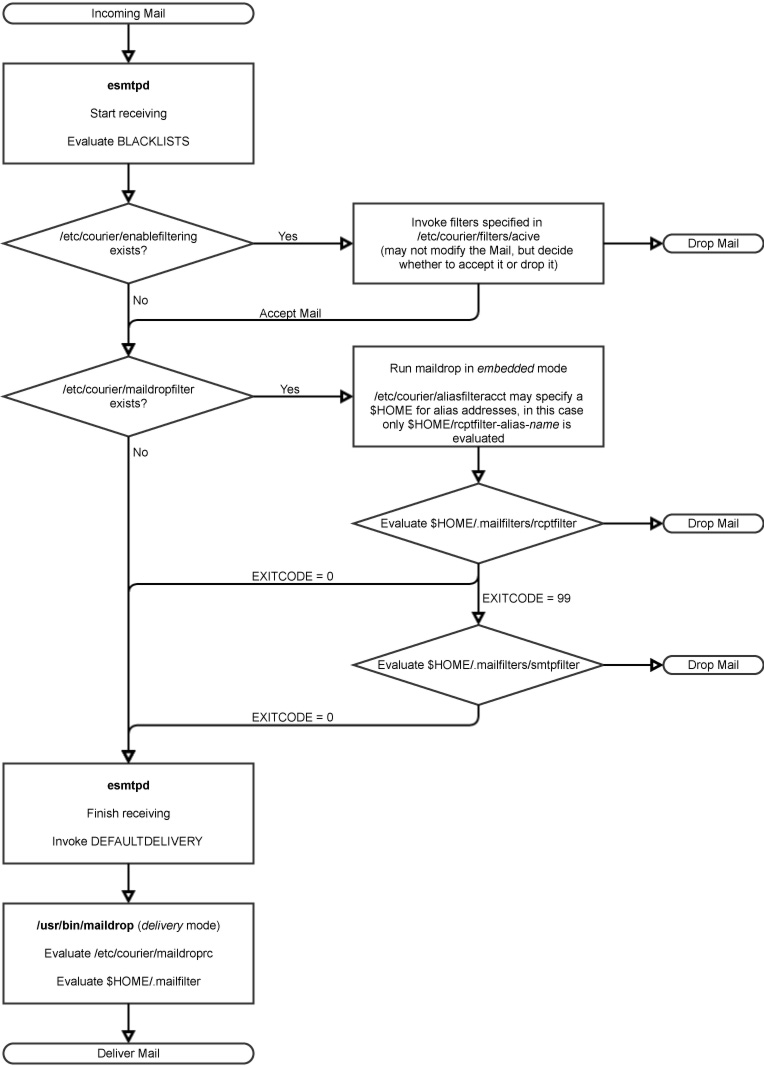
Setting up Mailman with the Courier MTA
Most recently I went through the troublesome procedure of setting up Mailman 2.15 on a Server running Debian Wheezy and the Courier Mail Server MTA. While everything needed could be easily installed from the official Wheezy Repo, it did by far not work out-of-the-box. Getting the Mailman GUI served via an Apache Server was a five minute task but when it came to the email processing it clearly seems that Mailman is more optimized to work with the more widely used Postfix MTA than with my favorite, the Courier Mail Server. Nevertheless some research and a few moments of debugging will get you a working setup. I would like to briefly sum up my experiences as I couldn’t find a single working tutorial for this, but lots of bits and pieces.
Let’s begin with something easy and do the Apache configuration first. This is pretty straight forward as there is a well-documented sample configuration file in /etc/mailman/apache.conf that I mostly used. I ended up with this
| |
Note that you have to set the DocumentIndex Option to add index.html for the public archive directory, just in case you also unset this on the global level.
The configuration of Mailman itself is also not too challenging. There is just the one /etc/mailman/mm_cfg.py configuration file. There you need to set the DEFAULT_EMAIL_HOST=’lists.domain1.tld‘ and DEFAULT_URL_HOST=’lists.domain1.tld‘ to some working hosts before actually setting up the first mailing list. If you already set up the required ‚mailman‘ site list and you are having trouble with the default localhost.localdomain setting, then you can still easily fix this with [1]
| |
Additionally I adjusted the DEFAULT_URL_PATTERN=’http://%s/mailman/‘ option to remove the cgi-bin part from the url, actually this is not important, it just has to be consistent with the Apache configuration. After this you can add the site list with
| |
and start the mailman daemon. You may just ignore the stuff about the aliases after creating the list or you may even go ahead and uncomment the MTA=None line in the mm_cfg.py to suppress this output, but I have not tested this. Now we should have Mailman running and Apache serving a working GUI.
In the next step we need to find a good solution to handle the incoming emails that need to be forwarded to the Mailman Server. While this theoretically can be done via aliases, this is quite troublesome and aliases have to be updated whenever a new list is created. There is a short note from 2003 on how this can be accomplished [2], however this failed due to a recent bug in the makealiases script [3]. The second solution that I came across involves forwarding all emails that Courier cannot deliver to any local mailbox or alias to a Python script courier-to-mailman.py [4] which is also around for more than a decade and recently has finally made it into the Mailman source [5], where you may download it (the script is found in the /contrib folder). I followed the pattern of the postfix-to-mailman.py script, copied the file to /etc/mailman/courier-to-mailman.py and linked it to be available from /usr/lib/mailman/bin/courier-to-mailman.py. While this is just a modified version of the postfix-to-mailman.py, it needed some tweaking in order to work properly. First of all, as I didn’t use the configure script from the source, you may have to manually insert the proper paths in the courier-to-mailman.py. For Wheezy, replace @prefix@ by /usr/lib/mailman and @VAR_PREFIX@ by /var/lib/mailman. Also, the hardcoded sendmail path didn’t work, but I am not quite sure if this is a general problem in Wheezy or just on my specific setup, where I had to adjust the path to /usr/sbin/sendmail. Last, ensure that the script is executable, which means including something like
| |
If this is not already included (this depends on which version you downloaded) and setting permissions accordingly.
Now we have to configure the Courier MTA, to forward all the emails intended to be processed by Mailman to the script. Here I found the comments in the script somewhat misleading. First, the (Sub-)Domains receiving the emails have to be added to /etc/courier/esmtpacceptmailfor.dir/esmtpacceptmailfor and /etc/courier/hosteddomains. Don’t forget to run makeacceptmailfor and makehosteddomains and ensure that the configuration gets properly reloaded at this point. Then we simply create /etc/courier/aliasdir/.courier-default with the following content
| |
This forwards all incoming emails that cannot be delivered to any local mailbox or alias to the respective script. This method however comes with the disadvantage, that from now we accept all incoming emails with a „250 OK“ message and since we want to avoid producing backscatter spam we are not able to bounce undeliverable emails at a later point (depending on your use-case this might however be legally required). Theoretically we could also create a .courier-listname-default file with the very same content to reduce the amount of garbage emails we forward to the script and have them dropped earlier, but this file only processes emails for the pattern listname-xyz@lists.domain.tld. For Domains listed in hosteddomains it is not possible to have a /etc/courier/aliasdir/.courier-listname file which takes care of the emails addressed to listname@lists.domain.tld. For this to work we would have to list the respective Domain in /etc/courier/locals instead of hosteddomains, which would imply that all emails addressed to any-system-account@lists.domain.tld would be delivered to the corresponding system account [6]. This would again most likely increase the amount of garbage emails especially addressed to root@… or other well-known accounts. The further procedure however is the same for both methods. Ensure that the /etc/courier/aliasdir/ directory is owned by daemon or the respective user that is running courier, otherwise you will later get an „511 maildrop: Home directory owned by wrong user“ error [7]. The last thing we have to teach Courier in order to let Mailman send emails is to allow relaying via the local IPv6 address (::1). This also turned out to be somewhat tricky as there is a uncommon notation used in /etc/courier/smtpaccess/default [8] and there are mostly wrong solutions for this posted. This might has changed in current releases but in Courier 0.68.2 that comes with Wheezy the only solution that works is exactly adding the line
| |
to smtpaccess/default – replace with an actual TAB, don’t use any additional spaces, multiple TABs etc. and don’t forget to run makesmtpaccess afterwards. Alternatively you may run Mailman using authenticated SMTP to send emails [9], but I have not tested this.
Go ahead and play around a little bit sending emails to mailman@lists.domain.tld, adding some externally hosted email addresses to this list and make sure everything is working. It is not? Well, then you might have stumbled upon one of those two problems:
Getting an „IOError: [Errno 13] Permission denied“ error in /var/log/mailman/error, stating an permission error in somewhere in the /var/lib/mailman/archives directory? Then make sure the entire archive directory is owned by the user list.
Playing around with aliases and getting an „456 Address temporarily unavailable“ error in your courier log, even after changing the config and restarting courier-mta? Then check the mailq, make sure to cancel all pending undeliverable messages with cancelmsg and the clean the /var/lib/courier/track directory. There, Courier keeps track of undeliverable addresses for a certain amount of time or until the message could be delivered and blocks any further incoming message to this address. This is especially annoying if you play around with different configurations.
Last, I implemented a host filter into courier-to-mailman.py, in the hope to decrease the wasted computing power on incoming garbage emails. The accepted Domains are hardcoded, but can be easily adjusted (see comments in the script). This is the final courier-to-mailman.py script that I came up with.
Finally there is to note positively that the update to Mailman 2.1.18 from the wheezy-backports went smooth as an usual Debian update does and negatively that Mailman uses a global namespace, which makes it impossible to provide two separate lists with the same name under two different domains running a single instance [10]. Although I don’t want to take care about this until the first naming conflict arises, I already stumbled upon a possible solution [11].
[1] https://www.progclub.org/blog/2012/02/01/mailman-fix_url-py/
[2] https://mail.python.org/pipermail/mailman-users/2003-March/027187.html
[3] https://bugs.debian.org/cgi-bin/bugreport.cgi?bug=703570
[4] https://mail.python.org/pipermail/mailman-developers/2006-November/019274.html
[5] https://ftp.gnu.org/gnu/mailman/
[6] http://www.courier-mta.org/dot-courier.html
[7] http://ehc.ac/p/courier/mailman/message/18549088/
[8] http://www.courier-mta.org/couriertcpd.ht
[9] https://mail.python.org/pipermail/mailman-users/2005-October/047086.html
[10] http://wiki.list.org/DOC/4.47%20Virtual%20domain%20hosting%20with%20Mailman%3F
[11] https://code.launchpad.net/~msapiro/mailman/vhost
This article is licensed under CC BY-NC-SA 4.0